We are making it easier to bring all kinds of work into Moqups. As part of this push, we recently launched our Figma plugin so you can quickly move Figma designs into our app.
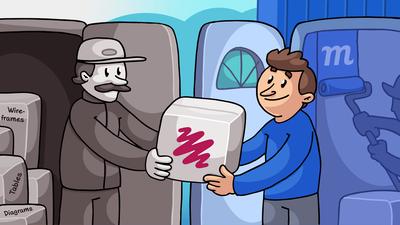
We've also just rolled out a native Balsamiq import so you can copy wireframes directly from Balsamiq and paste them right into your Moqups project, with no plugins required.
But today's release goes much further than that – and it has the potential to completely change your Moqups workflow.
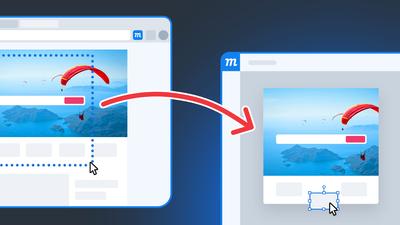
This new release allows you to import whole webpages, selected elements, and AI iframes directly into Moqups – as fully editable hi-fi designs or as lo-fi wireframes. To make that possible, we've expanded the functionality of our browser extension.
- Moqups Extension with webpage and AI design import
- Turn your live webpages into editable mockups
- Convert hi-fi webpages into lo-fi wireframes
- Responsive capture
- Design with AI
- Design briefs and more
- How to install the Moqups extension
Moqups Extension with webpage and AI design import
Until now, our Moqups extension could only capture screenshots (and it still does!). And sure, that was useful for moodboards and research. But it also meant that when teams were doing updates to their websites, they had to build an editable design on top of each screenshot – just to change the design or text. This was tedious and time-consuming work, so we’ve eliminated that step entirely.
With our updated extension, you can now copy any webpage or AI iframe directly into a Moqups project. The designs come in as fully editable layouts – with each element separated for easy selection and customization. We've also added a neat feature that allows you to capture pages in whatever responsive design format you prefer: desktop, laptop or phone.
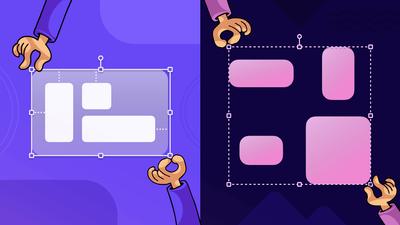
The extension also gives you the option of bringing in a design exactly as it appears – in high-fidelity – or converting that design into a grayscale, low-fidelity wireframe. The hi-fi option is great when you need to maintain or iterate on existing designs. And the lo-fi option lets you use existing designs as wireframe templates for more foundational work.
We’ve been using this feature internally for a couple of months now, both testing and refining it. It has simplified and accelerated our own workflow, and we think it will revolutionize the way your team works as well – both with your own webpages and with AI generated designs. Here’s how you can work with our extension:
Turn your live webpages into editable mockups
There are all kinds of reasons that teams might want to capture their live pages and edit them.
One is simple maintenance. Once pages are launched, they still need to be modified on a regular basis. Over time, all kinds of content – product descriptions, screenshots, feature lists, marketing language, and social proof – may all need updating.
Another reason is that teams often need to create additional landing pages, but may also want to ensure that those pages match the style of their already published assets. An example might be adding a new case study, product feature, or industry solution page. They may even want to build an entirely new type of page, but maintain the basic components and branding of the site as a whole.
There’s also one of the most overlooked and under-discussed aspects of web work – one that we wrote about in our recent post about The Hidden Work in UI/UX Design: the iterations that occur within the internal hubs of large organizations. These portals are the back-office websites for insurance companies, retail outlets, health networks, universities, rental companies, financial organizations, municipalities and governments. The teams working on these data-heavy sites need quick ways of copying and adjusting input modals and dashboards across thousands of pages.
For each of these workflows, users had to take screenshots, and build new designs and content on top of them. This was time-consuming and frustrating work – matching fonts, colors, text boxes, and image placeholders. Now, with one click, they can bring those designs right into Moqups and start editing both layout and copy.
Convert hi-fi webpages into lo-fi wireframes
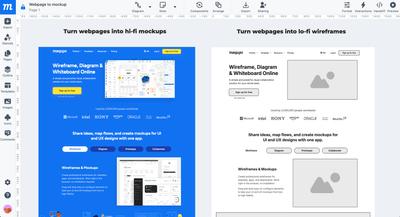
Our extension also provides the ability to turn high-fidelity webpages into low-fidelity wireframes. On the surface, that would seem to reverse the normal lo-mid-hi-fi process, but there are several reasons why you might want to do this:
- You’re in the process of rebranding – or adopting a different color scheme – and you want to preserve the basic components and copy of the layout, but start with a visual blank slate.
- You want to compare a wide range of base layouts, experiment with different design solutions, and build your own template.
- You want to find useful elements – sometimes from completely different domains – that help solve a tricky UI problem. In fact, one of the most flattering things we've ever heard from a client was that, when they got stuck with their UI design, they looked to our own app for a solution.
Responsive capture
In addition to bringing in webpages as hi-fi or lo-fi, we’ve also added a neat feature that lets you capture pages in whatever responsive design format you’d prefer: desktop, laptop or phone.
Design with AI
If you use LLMs in your design process, you can now turn AI-generated artifacts into editable layouts. Just click on the iframe in the AI window – or select a specific element within it – and copy the design straight into Moqups to start editing.
This means you can use AI as a template generator – providing the bulk of the layout and placeholder text – before you customize and finesse the details in Moqups. Your team can also jump back and forth between Moqups and your own AI tool, exporting sections for regeneration, and then refining the output step by step.
Here’s an example of what that workflow might look like:
Ask Claude to build a webpage based on all the existing documentation you’ve provided. If the LLM’s first draft isn’t ready for prime time, and needs a lot of tweaking for both style and content, use our extension to bring it into Moqups. Fix a couple sections in Moqups, then export that design as a PDF and ask Claude to take another shot at it – based on the direction that you’ve now established.
Jumping back and forth like that saves you tokens, gives you more control over the generated content, and helps your AI get better at the task as you work down the scroll.
Design briefs
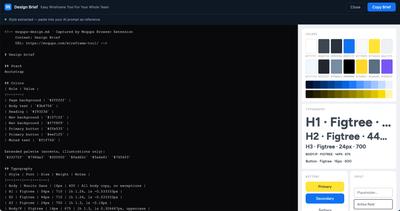
This is a great tool if you’re working with AI and need to give it your branding guidelines. It extracts the style from any browser window to generate a design brief. You can then paste the brief into your AI prompt so it knows what specs – colors, typography, button and input style – to use as a reference for any new design generation.
How to install the extension and what’s next
If you’ve already installed our extension, then you don’t have to do anything – it will update automatically. If you don’t currently have it, just go to the Chrome Web Store or the Firefox Browser Add-ons page to install it. If you use Safari as your browser, please be patient and stay tuned cause we are working on a version for you too! As always, we’d love your feedback at support@moqups.com