Turn webpages and AI layouts into editable mockups
Import live webpages, page areas, and AI-generated layouts into Moqups as fully editable hi-fi designs or lo-fi wireframes.
Webpage Import
Bring any live webpage into Moqups
Click the extension icon to select a full page, an area, or individual elements. Paste right into Moqups as a fully editable layout with each object ready to customize.
- Import the full page or select a specific area
- Capture individual elements by using the space bar
- Paste into an existing project or open in a new one
Import as desktop, laptop, or phone view
Choose the viewport size before you even import. That way, the layout pastes into Moqups in the exact format and dimensions you need – not just what's displayed in your browser.
AI Design Import
Capture AI layouts and make them your own
Bring AI drafts right into Moqups. Edit them with your team in a collaborative space – and save tokens too! Refine the copy, adjust the layouts, and fix any details that AI gets wrong. Then export a PDF of the revised version for your next round with AI.
- Click the iframe to copy the design
- Import as hi-fi design or lo-fi wireframe
- Works with any AI tool that renders an iframe
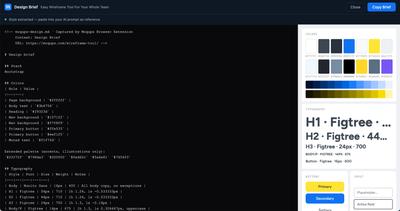
Help AI match your brand and style
Extract the visual style of any open browser window – colors, typography, button styles, input styles – and generate a structured design brief. Paste that brief into an AI prompt so the layouts it generates accurately reflect your branding and design system.
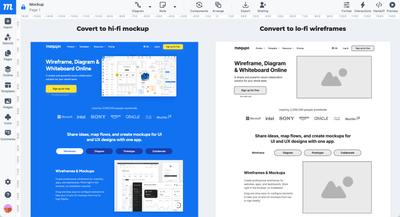
Import designs at full fidelity – or turn them into wireframes
When converting a webpage or AI layout, you have two options: import the design exactly as it appears – as a hi-fi layout – or convert it to a lo-fi, grayscale wireframe. Either way, you get a fully editable mockup – but one puts the focus on branding and style, the other on structure and content. It's your choice!
Every element is yours to change
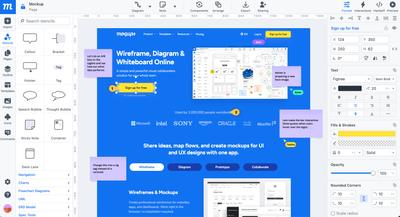
Imported designs arrive as fully editable layouts so you and your team can start editing, updating, and customizing in seconds.
Edit copy
Click any text block to update headlines, labels, and button copy.
Adjust colors & fonts
Change colors and typography across select elements or the whole layout.
Replace images
Swap placeholders and visuals with your own assets from your image library.
Add UI components
Drag in buttons, forms, modals, and icons from Moqups' stencil library.
Resize & rearrange
Move, reorder, and resize any element using guides and snapping.
Comment & collaborate
Work with your team in real time, and leave comments and annotations on the design.
Bring your team together to make work better
Share ideas and meaningful conversations – both sync and async – with live cursors, sticky notes, annotations, and color-coded comments. Collect feedback, specify requirements, build consensus and make great decisions.
Frequently asked questions
Which browsers does the extension support?
The extension is available for Chrome and Firefox. Brave users can install the Chrome version directly. A Safari extension is in development and we'll share an update when it's ready.
Is it free?
Yes, the extension is free to install and use. To paste imported designs into a project you'll need a Moqups account – which is also free and doesn't require a credit card.
Does it work with any AI tool?
Yes. The extension can import any AI design that renders as an iframe in your browser. This includes artifacts from Claude, ChatGPT, Gemini, and others. Click the iframe to import the full layout, or use the spacebar to select a specific element within it.
What else can the extension do?
A few other capabilities worth knowing about: Screenshots: Grab the visible area, a custom selection, or the full page and save it directly to your Moqups team image library. Useful for mood boards, competitor research, and quick reference. Note: screenshots are image captures, not editable layouts. Create projects instantly: Hit the Moqups extension icon in your browser to create a new project or jump straight to your dashboard without switching tabs. Color picker: For Chrome versions prior to 95, the extension activates our in-app eyedropper so you can sample any color from your browser and apply it to your design elements.
What does 'fully editable' mean?
When you import a webpage or AI design, it doesn't arrive as a flat image. Every component – text, buttons, images, nav elements, input fields – arrive as separate objects in your Moqups project. You can click any element to select it, adjust colors and fonts, replace images, move things around, and drop in new UI components from our stencil library.
I already have the Moqups extension. Do I need to update it?
No, it updates automatically. If you installed it previously, the new features are already available.
Start importing. Stop rebuilding.
The extension is free and takes about ten seconds to install.